


A demat account is a type of account that allows investors to hold their securities in electronic form. You might have a Demat account that you use for personal trading and you might have created a new one for a PMS where you want to transfer those shares.
Securities can be transferred from one demat account to another in a few simple steps.
The process of transferring securities from one demat account to another is called a demat transfer.
First thing is to find out which type of depository is at the back of your Demat account. There are two depositories in India - CDSL and NSDL.
So, there are three types of demat transfers:
CDSL to CDSL transfer: This type of transfer is used to transfer securities from one demat account that is registered with CDSL to another demat account that is also registered with CDSL.
NSDL to NSDL transfer: This type of transfer is used to transfer securities from one demat account that is registered with NSDL to another demat account that is also registered with NSDL.
Inter-depository transfer: This type of transfer is used to transfer securities from one demat account that is registered with CDSL to another demat account that is registered with NSDL, or vice versa.
Online Process
CDSL to CDSL Transfer
CDSL provides an online facility to transfer the shares from one Demat account to another using CDSL Easiest. To use this facility, both the Demat account should be with CDSL.
Steps to transfer shares using CDSL Easiest:
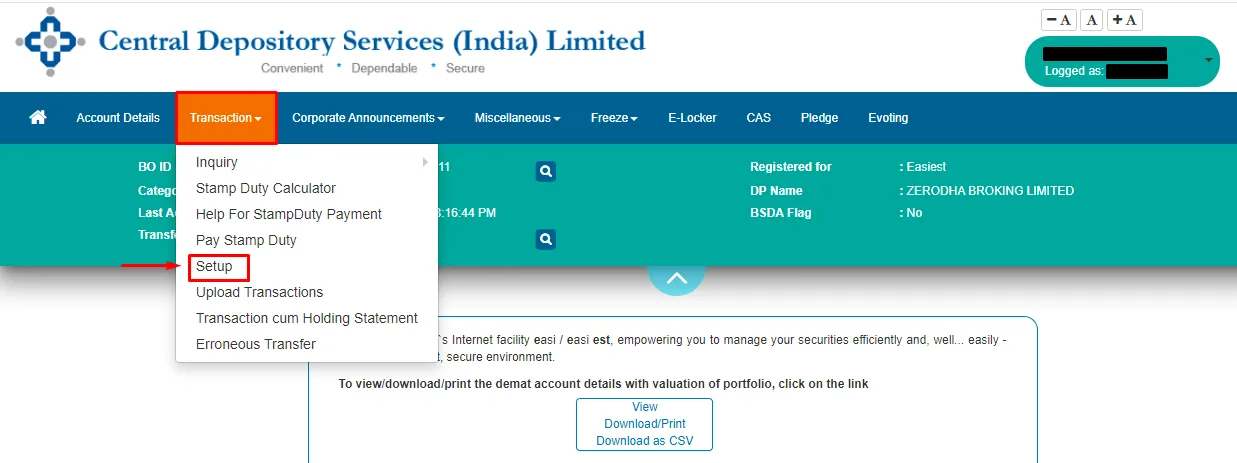
Register for CDSL Easiest.
Add Trusted account details. (You can add up to 4 trusted accounts) The activation of trusted accounts may take up to 24 working hours.
Once the trusted account is set up, go to 'Setup' on the transaction section.
Select Bulk Setup.
Click on the Transaction tab.
Enter the below details and Submit
Execution date.
Recipient BO ID.
ISIN
Quantity
Reason for transfer
Click on verify to verify your request.
Click on Commit.
Enter your CDSL Easiest PIN and click on OK. (8- digit pin received at the time of CDSL Easiest registration)
Once the DP confirms the request, the shares get transferred.
NSDL To NSDL Online Transfer
Follow these steps to understand how to transfer shares from one Demat account to another online:

Online transfer of shares through NSDL ‘Speed-e’ facility. Get registered at NSDL website. Visit this page > New User Registration > Speed-e>Register
Once the form is filled and submitted to the website, you need to take a printout of the form and submit it to your broker.
The broker will further submit the form to the central depository to verify your details.
Once the broker verifies your details, your account will be activated, and you will receive login credentials through email. Now you can log in and transfer shares from one Demat account to another.
Inter Depository Transfer
An inter depository transfer allows investors to move their shares from one depository to another, specifically from CDSL to NSDL Share Transfer or NSDL to CDSL Share Transfer. Let's look at both of these in depth below:
CDSL to NSDL Transfer
To initiate a CDSL to NSDL share transfer, you need to fill out an Inter Depository Instruction Slip (DIS) provided by your Depository Participant (DP).This form requires details such as your DP ID, client ID, and the specific shares to be transferred. Once the form is submitted, the shares are transferred from your CDSL account to your NSDL account, typically within a few days.
A digital signature certificate that costs Rs. 2,250 + taxes is necessary for the inter depository transfer utilising CDSL Easiest. However, for intra-depository transfers, CDSL’s Easiest facility is practical. As a result, transferring the shares via offline means is recommended while doing a one-time transfer from CDSL to NSDL.
NSDL to CDSL Transfer
To transfer shares from NSDL to CDSL online, you need to follow a few straightforward steps. First, log in to your NSDL account through your Depository Participant's (DP) online portal. Then, access the inter depository transfer section and fill out the necessary details, including your CDSL DP ID and client ID. Specify the shares you want to transfer and confirm the transaction. Your DP will process the request, and the shares will be transferred from your NSDL account to your CDSL account. This online method provides a convenient and efficient way to manage your portfolio across different depositories.
A digital signature certificate that costs Rs. 2,250 + taxes is necessary for the inter depository transfer. Transferring the shares via offline means is recommended while doing a one-time transfer from NSDL to CDSL.You need to register for Smart card-based access to Speed-e to procure a digital signature certificate (DSC) to submit an on-market or off-market inter depository transaction of your choice.
Understanding the process of inter depository transfer is crucial for investors who wish to consolidate their holdings or switch between depositories for better services.
Offline Process
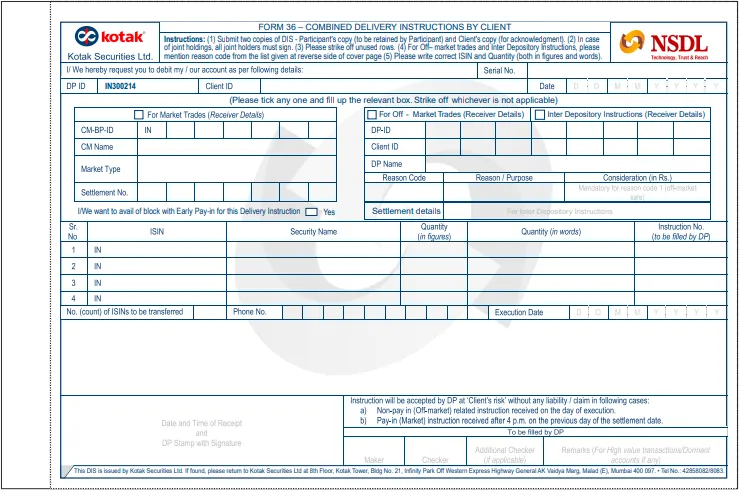
Procure an Inter-depository DIS from your DP/broker or ensure to select the Inter-depository if the DP/broker has a common DIS for both.
Fill in the target beneficiary details like DP ID, Client ID.
Fill in the details of the stock to be transferred viz. ISIN, Security name, Quantity.
Sign the DIS.
Submit the DIS to your DP/broker.